Records / Public Information
Intake, track, and fulfill public-records (FOIA/PIA) requests — statutory deadlines, response logging, responsive documents with redaction, copy fees, and a transparency portal.
A requester files a records request from the portal — or staff log one on their behalf for walk-in, phone, or mail. Each request gets a tracking code and a statutory due date; staff work the queue, watch for overdue items, attach responsive documents with redactions, charge copy fees, and publish to the transparency portal.
What you can do
Log requests on behalf
Enter a walk-in, phone, or mail requester — name, email, preferred language, subject, description, and an optional department. The request gets a tracking code.
Track statutory due dates
Every request carries a due date; overdue items are flagged in red, and the Overdue KPI keeps the count in view.
Filter the request queue
Filter by status, by assignee, or "Overdue only," and jump straight to any status from the by-status breakdown.
Respond & redact
Log responses, attach responsive documents with redaction, and move the request through its statuses to completion.
Charge copy fees
Assess copy fees on the shared ledger; the request row shows the fee and its payment status, and fee revenue rolls up as a KPI.
Publish to the portal
Publish fulfilled requests to the transparency portal; the Published KPI tracks how many are live.
A typical workflow
- Request arrives — filed by a requester from the portal, or logged by staff with Log a request; CiVQ assigns a tracking code and a statutory due date.
- It enters the queue — assign it, set the department, and work it before the due date; overdue items are flagged.
- Records are gathered — attach responsive documents, apply redactions, and log the response.
- Copy fee is assessed — any copy fee goes on the shared ledger; payment status shows on the row.
- Request is closed & published — mark it complete and publish to the transparency portal where appropriate.
A closer look
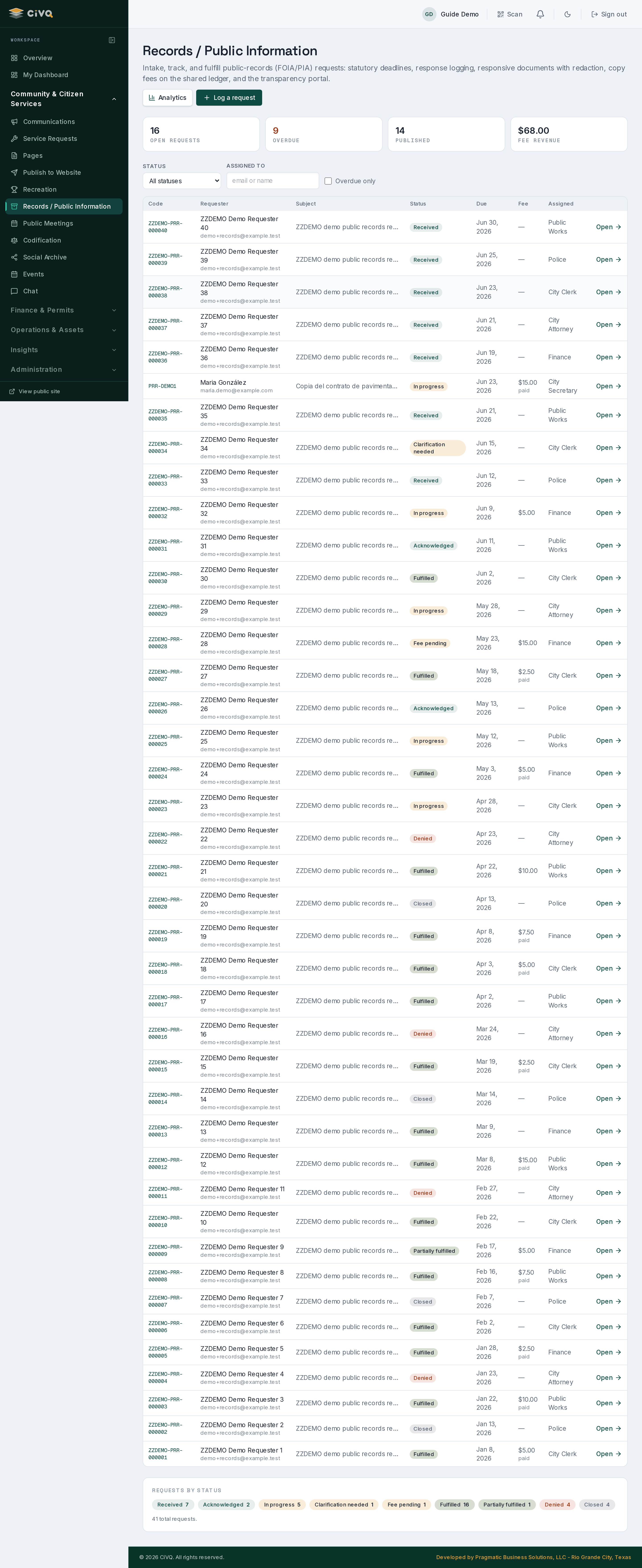
Staff:
/dashboard/records (with an Analytics view). Requesters file and track requests from the resident portal; fulfilled requests can surface on the public transparency portal.Works with
Documents for responsive files & redaction · Communications for requester notices · Website for the public transparency portal.