Permits & Licensing
One tracked pipeline from application to issuance — intake, review stages, fees, and the permit (or the denial) at the end.
A resident or contractor applies online; staff move the application through review, collect the fees, and issue the permit — every step visible, every status pushed back to the applicant in their own language.
What you can do
Take applications
Residents apply from the portal, or staff enter a counter/phone application. Each one lands in the worklist with its type, applicant, and location.
Move through review
Walk each application through its review stages, assign reviewers, and record decisions — so nothing stalls without a reason.
Assess & track fees
Attach fees to a permit type, see total revenue, and hand payment off to the Payments module for a bilingual receipt.
Issue or deny
Issue the permit or record a denial with a reason; the applicant is notified at the change.
Search & status
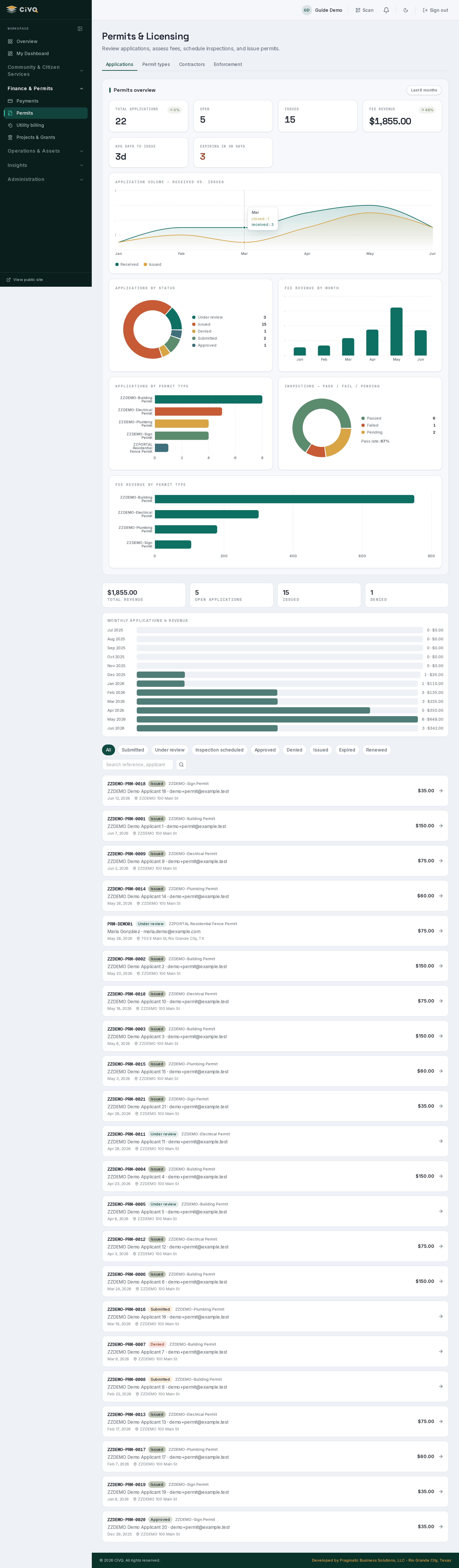
Filter by status (open, issued, denied), search by applicant or address, and see counts at a glance.
Keep applicants informed
Status changes notify the applicant automatically — in the language they applied in.
A typical workflow
- Application arrives — from the resident portal (with any required details/attachments) or entered by staff.
- Review begins — it appears in the worklist; staff assign it and advance it through the review stages.
- Fees are assessed — the applicable fee is attached; payment is recorded (check today; card is a future add-on).
- Decision is recorded — the permit is issued, or denied with a reason.
- Applicant is notified — at each status change, bilingually, and revenue rolls up on the dashboard.
A closer look
Staff:
/dashboard/permits. Residents apply from the tenant's resident portal; the application flows straight into this worklist.Works with
Payments for fees & receipts · Records for public-information requests · Communications for applicant notices · Documents for attached plans & certificates.